Decision Desk app coming soon. Thanks for being early.

How to use Slack to make and track real decisions — not just talk about them.

Date: November 6, 2025

We’ve all seen it happen.
A team spends half a day in Slack debating a release date, or a pricing change, or whether to hire that extra designer. Everyone weighs in. The thread dies down. A week later, no one remembers what was decided or who was supposed to follow up.

Slack wasn’t designed for decision-making — it was designed for conversation. But in today’s distributed teams, it’s where decisions actually happen. The problem is not that Slack is too noisy; it’s that decisions inside it disappear as quickly as they’re made.

At Decision Desk, we’ve spent years studying how teams decide — what makes a choice stick and what makes it evaporate. The key isn’t more structure or new channels; it’s visibility and follow-through.

This guide shows how to turn your existing Slack workspace into a working decision system — one that connects conversation to clarity, without adding bureaucracy.

Table of Contents

Frame 1 (39).webp
Frame 1 (40).webp
Frame 1 (39).webp

5 min read


Why Slack needs structure for decisions

Slack is built for speed, not permanence. Messages stream by in real time, which makes it great for brainstorming and reaction. But when a decision happens in that same flow, it’s almost invisible.

A typical thread might end with: “Okay, let’s ship it Friday then.”
Everyone sees it, agrees, moves on. A week later, “Friday” has come and gone, and no one can find the message where that choice was made.

That’s why decision systems matter. They don’t replace Slack — they give its activity structure. Every team already has an informal decision system; the best ones just make it explicit.

When you capture each decision clearly, the value compounds:
– You create a running log of why choices were made.
– You prevent the same debate from happening twice.
– You can see patterns — which types of decisions stall, who tends to act quickly, where bottlenecks appear.

Slack can become that system if you treat it intentionally.


Principle1/5
media _ speaker, sound, audio, music, volume, increase, decrease.png

Capture the moment decisions happen

A decision has a short half-life. If you don’t capture it within minutes, context fades and people move on.

The simplest rule: when someone says “So, we’ll go with option B,” stop and record it. Create a short, action-based summary right there in Slack.

Example:
“Decision: Launch pricing experiment to 25% of new signups starting Friday. Owner: Sam.”

That one line changes everything. It turns a transient chat into an explicit commitment.

Why it matters
– Everyone knows a decision was made.
– There’s no ambiguity about timing or scope.
– Ownership is clear from the start.

How to apply it

  1. Agree that every major discussion ends with a short “Decision:” message.

  2. Keep it one sentence: verb + subject + constraint.

  3. Pin or star that message so it doesn’t get lost.

Example
In one engineering team, every feature discussion ended with a pinned message like “Decision: Merge feature flag cleanup by Wed EOD. Owner: Devin.”
A week later, there was no confusion about what was decided or who was on the hook.

In Decision Desk
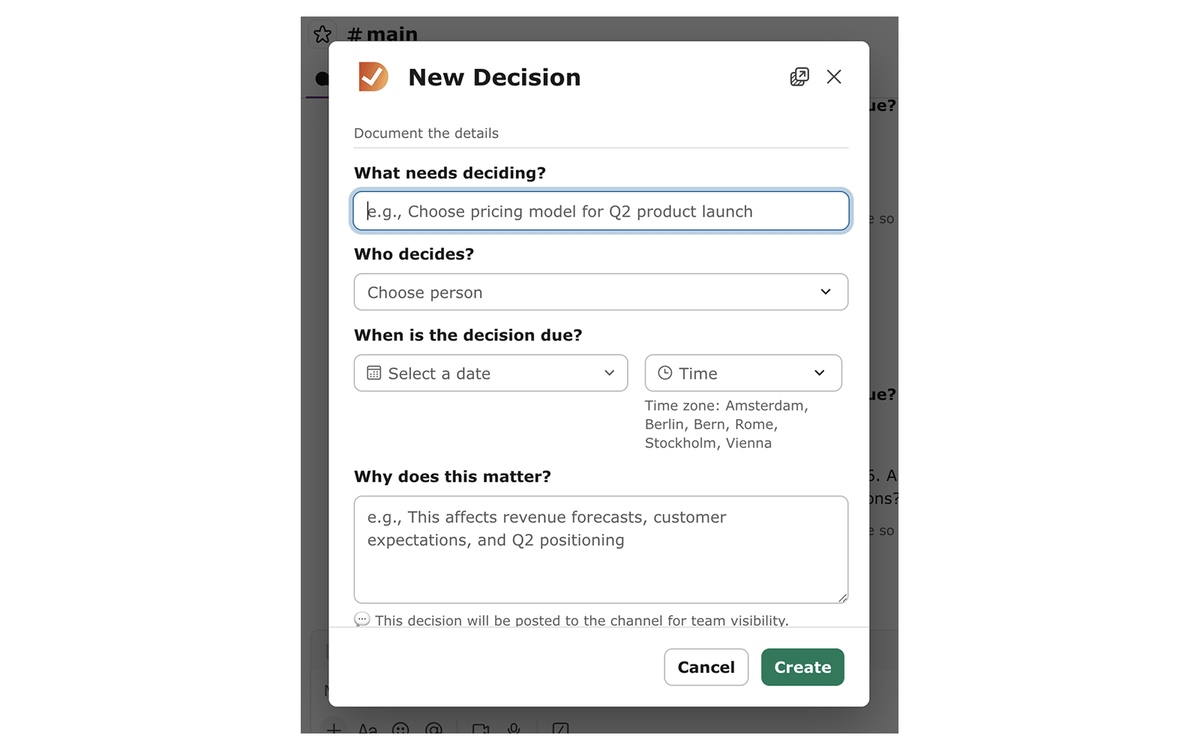
Decisions captured in Slack can be logged directly. Each record keeps context, owner, and next step — building a decision history automatically.

Principle2/5
communication, messages _ chat, message, conversation, text, talk.png

Use clear, action-based titles

You’d think everyone knows what “we need to decide X” means—but in practice they don’t. Clarity on what and by when matters.

Most teams name decisions too vaguely: “Pricing,” “Launch,” “Support issue.” These aren’t decisions — they’re topics.

Clarity starts with a verb. When you phrase decisions as actions, you make them visible and measurable.

Formula: Verb + Subject + Context
Example: “Approve onboarding flow for beta launch.”

Why it matters
– Verbs force clarity; they turn topics into actions.
– The subject keeps scope tight.
– Context prevents re-litigation later (“why did we decide this again?”).

How to apply it

  1. Start with an action verb: decide, approve, confirm, align, assign.

  2. Add the specific subject: pricing model, owner, release plan.

  3. Add a short constraint: for Q2 launch, before Friday, under $10k budget.

💡 Pro tip: Read your title aloud after “We need to…”
If it sounds crisp — “We need to approve pricing model for Q2 launch” — you’ve nailed it.

In Decision Desk
Titles follow this same structure automatically. Each new decision prompt begins with an action verb to guide clarity from the first word.

Principle3/5
communication, messages _ chat, message, conversation, talk, type, typing.png

Make ownership visible

A decision without an owner is just a conversation.

In most Slack threads, the loudest voice wins, but no one walks away knowing who’s accountable. The cure is explicit ownership — not assumed, not implied.

Why it matters
– It gives the decision a driver.
– It prevents “someone thought someone else was doing it.”
– It allows others to follow up confidently.

How to apply it

  1. Add “Owner:” to every decision message.

  2. Tag the person directly (@sam).

  3. Confirm they acknowledge it (“✅ got it”).

  4. Record it in your decision log.

Example
When product teams at a SaaS company began tagging owners on every decision, follow-through rates jumped within a week. The change was cultural — ownership became visible, not assumed.

In Decision Desk
Every decision includes an owner field. That ownership travels automatically into follow-ups and reports.

Principle4/5
communication, chat _ messaging, message, conversation, talk, text.png

Keep follow-ups discoverable

Slack’s biggest weakness is memory. Even good decisions vanish under a pile of new messages.

Why it matters
– If people can’t find the decision, they can’t act on it.
– Discoverability creates accountability.

How to apply it

  1. Pin the final decision message in its channel.

  2. Create a “#decisions” summary channel and post each one there.

  3. Use thread links when referencing older choices.

  4. Add “next check-in” dates inline (“review next Tuesday”).

💡 Pro tip: Encourage people to react with ✅ when they’ve seen the decision — a small signal of alignment that reduces “wait, did we agree?” moments.

Example
Operations teams often summarize every week’s top five decisions in one post. It takes five minutes and saves hours of back-scrolling later.

Principle5/5
media _ sound, speaker, audio, music, volume, increase, decrease.png

Build a habit of reflection

Decision systems improve over time only if you review them. Slack gives constant feedback — you can see patterns if you look.

Why it matters
– Teams learn how they decide, not just what they decided.
– Patterns reveal decision debt, bottlenecks, and clarity gaps.

How to apply it

  1. Review past decisions monthly.

  2. Ask: which ones led to rework? Which went smoothly?

  3. Note whether ownership was clear from the start.

  4. Adjust your structure accordingly.

Example
A product org noticed 80% of their re-discussions came from unclear owners. After enforcing explicit ownership and clear titles, those loops dropped dramatically.

SLA-appIcon-desktop.png

Implementing in Slack

You can do all of this manually in Slack without new tools:


– End threads with a “Decision:” summary message.
– Tag the owner.
– Pin or share it in a #decisions channel.
– Set a reminder for review.

💡 Pro tip: Add “Decision:” or “Outcome:” to the beginning of each summary — it creates visual anchors people can scan later.

Once your team builds the habit, a tool like Decision Desk simply automates what you already do — keeping the human process but removing the manual tracking.

Explore Our Guides

Practical frameworks and real-world advice for making decisions that stick.

How do I make decisions actually happen?

Learn how to assign ownership, track actions, and ensure teams decisions get done.

Decision-making frameworks: The complete guide

A practical guide to choosing and using proven decision-making frameworks—so every choice is faster, clearer, and easier to justify.

What are the best decision-making tools for Slack?

Turn Slack into your team’s decision hub with practical tools and frameworks for clarity, accountability, and visible follow-through.

Best Slack add-ons to capture and track decisions in real time

Find and follow every team decision in Slack with tools that make ownership, context, and follow-through automatic.

How Can I Assign Ownership of Decisions in a Cross-Functional Team?

A practical playbook for naming one final decider, mapping ownership by decision type, and keeping decisions visible across your team’s Slack.

Decision Desk Glossary of Decision-Making Terms

Your complete glossary of decision-making language — from DACI to follow-through — built for teams who want clarity in every choice.

Better Questions for Better Decisions

A collection of essential questions every team should ask to make faster, clearer, and more accountable decisions.

The 20 Decision-Making Frameworks Every Leader Should Know

Practical models, guiding questions, and real-world examples to make faster, clearer, and more accountable decisions.

Frequently asked questions

How can teams make decisions more visible in Slack?

Capture each decision in writing, include the owner, and post summaries to a dedicated channel.

Why do decisions get lost in Slack?

Because they happen in real-time threads without structure or clear capture points.

What makes a good decision title?

Start with an action verb, add the subject, and include a time or context.

How can I track decision ownership?

Tag the responsible person in Slack and record them in a visible log or Decision Desk.

How often should teams review past decisions?

Monthly reviews reveal patterns and prevent decision debt.

How does Decision Desk integrate with Slack?

It captures, tracks, and surfaces decisions directly from Slack, linking ownership to action.

Progress moves at the speed of decisions.

Get smarter about how decisions really get made.

Short, practical lessons on clarity, ownership, and follow-through — written by people who’ve been in the room.

Error

By submitting your email you agree to our Privacy Policy (see footer).

Cookie Settings
We use cookies to improve your experience. Manage your preferences below.

Cookie Settings

We use cookies to improve user experience. Choose what cookie categories you allow us to use. You can read more about our Cookie Policy by clicking on Cookie Policy below.

These cookies enable strictly necessary cookies for security, language support and verification of identity. These cookies can’t be disabled.

These cookies collect data to remember choices users make to improve and give a better user experience. Disabling can cause some parts of the site to not work properly.

These cookies help us to understand how visitors interact with our website, help us measure and analyze traffic to improve our service.

These cookies help us to better deliver marketing content and customized ads.