7 min read
We’ve all been there
Slack is buzzing, threads are active, ideas are flowing — and yet, no one can tell what was actually decided. Someone remembers a poll. Someone else thinks the decision was “implied.” A week later, the same topic comes back around, slightly reworded, like a ghost that won’t leave the channel.
After years of managing projects and decision-heavy teams, we’ve seen this pattern too many times. The conversation is vibrant; the outcomes are vapor. That’s why we started treating Slack not just as a chat tool, but as a decision environment — a place where calls get made, logged, and remembered.
In this guide, we’ll show how the best decision-making tools for Slack — from built-in workflows to specialized apps and frameworks — can help your team turn talk into traction. You’ll learn practical patterns to capture decisions, reach consensus faster, and make accountability visible without adding process bloat.
By the end, you’ll have a system that makes every decision traceable, searchable, and real.

Capture decisions in Slack (that you can actually find later)
A decision that can’t be found might as well not exist.
Teams make hundreds of calls in Slack every month — approvals, prioritizations, naming debates, quick “yes, let’s ship it.” The problem is that these decisions live deep in threads and vanish within days. Visibility fades, context disappears, and people remake the same calls again.
Why it matters
Unlogged decisions become recurring debates.
Memory-based tracking fails after the next sprint.
Search only helps if there’s a consistent pattern to find.
Visibility builds trust and saves everyone from asking “Did we ever decide that?”
How to apply it
Create a clear signal for decisions.
Prefix messages with “Decision:” so Slack’s search can index them.
Keep each decision in a single thread.
That keeps rationale, context, and approvals all in one place.
Pin or save the final message.
It marks closure and gives new team members instant context.
Use a decision-logging app when stakes are higher.
Tools like Decision Tracker from the Slack Marketplace formalize ownership, tags, and audit trails.
💡 Pro tip:
When a decision is final, react to the message with a ✅ or custom “Decided” emoji. It signals closure without adding noise.
Example
In one product team, every release decision used to get buried in random channels. When they adopted a simple “Decision:” prefix convention and pinned results, they cut repeat debates by half. A few weeks later, they layered in a lightweight decision log. Suddenly, onboarding new engineers meant pointing them to a single Slack search — not a 30-minute oral history.
In Decision Desk
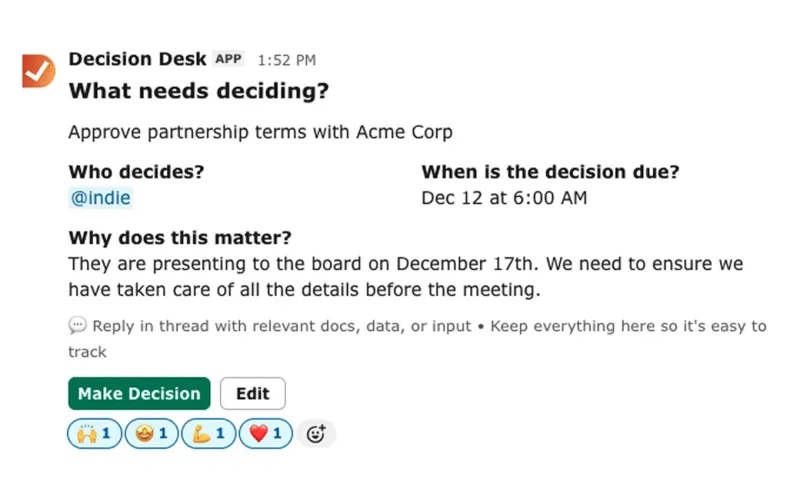
Every decision in Decision Desk automatically captures owner, context, and rationale right inside Slack. It stays visible in the channel, searchable by keyword, and easy to revisit months later. Clarity stops depending on memory.
Reach decisions faster
Some decisions die in discussion because no one closes them. Polls and surveys help teams move from talk to choice, but only when used intentionally.
Why it matters
Endless debate drains momentum.
Quick input builds alignment when stakes are low.
Polls help gauge sentiment without derailing threads.
Speed decisions free up time for complex ones.
How to apply it
1. Match the tool to the job.
Polly — great for structured workflows, anonymous votes, and recurring polls.
Simple Poll — perfect for quick one-question decisions (“Lunch option?” “Ship it now?”).
Geekbot — ideal for recurring stand-ups, team check-ins, and lightweight surveys.
2. Keep polls narrow.
Ask one focused question; decisions scatter when polls are vague.
3. Use polls to surface sentiment, not finalize ownership.
Let the accountable owner close the loop with a final message stating the decision and rationale.
4. Record the outcome immediately.
When the poll closes, post a “Decision:” summary in-thread for visibility.
💡 Pro tip:
If a poll gets more comments than votes, it’s not a poll problem — it’s a clarity problem. Step back and define the options first.
Example
At one marketing agency, they ran daily Slack polls to prioritize design tweaks. It worked until a big client project needed a single accountable owner. The team kept voting but no one owned the result. Once they paired polls with explicit owners and final “Decision:” messages, turnaround time dropped 40%.
In Decision Desk
Polls, reminders, and follow-ups flow naturally inside Slack. When a poll result triggers a decision, Decision Desk turns it into a logged item with an owner, timeline, and automatic reminder — closing the gap between “yes” and “done.”
Governance inside Slack
Frameworks like RACI, DACI, and RAPID exist for a reason — they clarify who’s accountable. But in Slack, that structure often dissolves into noise. Governance inside Slack means defining roles without adding bureaucracy.
Why it matters
When everyone is “involved,” no one is responsible.
Role clarity accelerates follow-through.
Governance protects decision velocity, not hierarchy.
Automated nudges replace status-chasing.
How to apply it
1. Assign one Accountable (A or Driver).
That person closes the decision loop.
2. List Responsibles (R), Consulted (C), and Informed (I) right in the thread.
Tag them once — don’t CC them in perpetuity.
3. Automate updates.
Use Zapier or Slack workflows to nudge the Accountable when deadlines near.
4. Store a light RACI template somewhere accessible.
A short snippet everyone can paste saves time.
💡 Pro tip:
Use verbs, not titles: “Taylor approves the release,” not “Product team owns QA.”
Example
A cross-functional launch team kept losing track of who approved what. They started posting each major call with a simple line:
A: Maya (final call)
R: Dev + Design
C: Marketing
I: Sales
It took ten seconds to add and prevented weeks of confusion.
In Decision Desk
Every decision in Decision Desk has one explicit owner and visible collaborators. Automated Slack nudges remind them when reviews are due, so accountability happens quietly in the background.
Structured decisions (SPADE in Slack)
For complex, high-impact calls, a quick poll isn’t enough. Teams need a framework that balances speed with reasoning. SPADE — Situation, People, Alternatives, Decide, Explain — is the simplest way to bring structured thinking into Slack.
Why it matters
Context prevents bad decisions from repeating.
Transparency builds trust in leadership calls.
Written rationale avoids second-guessing later.
SPADE keeps speed without sacrificing clarity.
How to apply it
1. Post the SPADE message template.
Use one Slack message with short sections:
Situation: [What’s happening and why it matters] People: [Who’s involved / affected] Alternatives: [Options briefly listed] Decide: [Chosen path] Explain: [Why this path]
2. Tag the Accountable person at the end.
They confirm the call and pin the message.
3. Pin or save the thread.
That preserves context for future readers.
💡 Pro tip:
Never skip the “Explain.” It’s what turns decisions into learning assets.
Example
A remote product team used SPADE to decide between two infrastructure providers. The thread captured trade-offs, tagged the final decision, and pinned the message. Months later, when costs came up again, new engineers could see why the team had chosen the original option — no rediscovery, no debate.
In Decision Desk
Decision Desk lets teams run SPADE posts directly inside Slack. Each field maps to structured metadata — owner, options, rationale — making every complex call traceable without leaving chat.
When not to use polls
Polls simplify alignment, but they’re not for everything. Some decisions — budget shifts, strategy pivots, hires, launches — need accountability, not consensus.
Why it matters
Popular doesn’t always mean right.
Polls can mask indecision behind numbers.
Serious calls need ownership and rationale.
How to apply it
1. Distinguish reversible vs. irreversible decisions.
Use polls for reversible choices; assign owners for big ones.
2. Always record the rationale.
Even if the group votes, someone must explain the “why.”
3. Treat polls as inputs, not outcomes.
Let them inform, not dictate, the final call.
💡 Pro tip:
If a poll feels too easy, it probably deserves a SPADE.
Example
One startup nearly derailed a product launch after a “fun” Slack poll split the vote on a pricing model. In the end, leadership re-ran the discussion using SPADE — laying out context and options. The team aligned quickly once reasoning was clear.
In Decision Desk
Decision Desk treats polls as decision inputs. Each can escalate into a formal decision with context, owner, and follow-up reminders — turning noise into structure without slowing teams down.
Implementing in Slack
Good decisions should live where your team already works.
If your team runs on Slack, you already have the foundation for visible, accountable decision-making. Channels, threads, and reminders give structure — all you need is consistency.
Start simple:
Create a #decisions channel or thread per project.
Tag the owner in each post.
Summarize the outcome and pin it.
Set a reminder for follow-up dates.
💡 Pro tip:
Pin key decisions or summarize them in the channel topic — a lightweight “source of truth” that outlives chat scroll.
As your team scales, manual tracking gets messy. That’s where a tool like Decision Desk helps. It builds on Slack’s natural flow — logging each decision, owner, and reminder automatically — so accountability happens with no extra effort.
What’s New in 2025
Slack AI now makes it easier to summarize and retrieve past decisions. Channel recaps and message insights can surface key calls automatically, turning your conversation history into a searchable decision archive. As AI evolves, teams that already record decisions clearly will benefit most — machine summaries only work if the signal is strong.
Closing reflection
Clarity. Visibility. Accountability. These three make or break decision velocity.
Teams that treat Slack as a living record — not just a chat room — move faster and argue less. Every decision gains weight when ownership and rationale are visible.
Decisions only die in the dark. Keep them visible.
If you’re ready to make that easy inside Slack, Decision Desk helps you start right where your team already works — turning talk into traction, automatically.

Frequently asked questions
What’s the fastest way to make a decision in Slack?
Post a short SPADE message outlining context and options. Tag the owner to confirm and pin the final call.
Which Slack poll app should I use?
Use Polly for workflows and anonymous feedback, Simple Poll for one-click choices, and Geekbot for recurring stand-ups or sentiment checks.
How do I keep decisions findable?
Use consistent “Decision:” headers, threads, and pins. For critical calls, use a decision-logging app like Decision Tracker or Decision Desk.
Can RACI live in Slack?
Yes. Define one Accountable, tag Responsible's and Consulted's, and use automated reminders to keep updates flowing.
Progress moves at the speed of decisions.