5 min read
Summary
In many organisations we see the same pattern: a decision starts in Slack, generates a lively thread, then drifts into silence. No owner, no follow-through, no progress. We've lived this as a project managers, operations leads and founders: decisions get stuck in chat, momentum evaporates, teams assume consensus that never existed.
This article shows how to spot the “Slack decision bottleneck” and fix it with five clear principles you can apply today—from clarity of ownership to tracking outcomes—and then how we at Decision Desk operationalise those principles so teams don’t just decide, they deliver.
Whether you’re a startup, a volunteer group or mid-size organisation, you’ll learn habits real teams use (not theory alone) and how to embed them in Slack (with or without tools).

Define decision ownership
When a decision starts in Slack, discussions proliferate but no one signs up to “own” the outcome. That’s the root of the bottleneck.
Why It Matters
Without a named owner, accountability vanishes.
Ownership creates the signal: “This decision will be made and acted on.”
Ownership reduces duplication, confusion and drift.
How to Apply It
At the start of a decision conversation, explicitly name the person who will own the call.
That owner confirms whether they have authority (budget, scope, resources) to make the decision.
The owner posts a message like: “I will decide on X by date Y.”
Team members align their inputs accordingly.
Pro tip: Use the phrase “I own this decision” in the thread to codify the shift from discussion to resolution.
Example
At a previous company we were debating which feature to prioritise. The Slack thread spanned days. Finally one senior Project manager typed: “I’ll weigh the options and decide by Friday 1pm.” Everything shifted. We saw clarity. Resources lined up. We delivered.
In Decision Desk
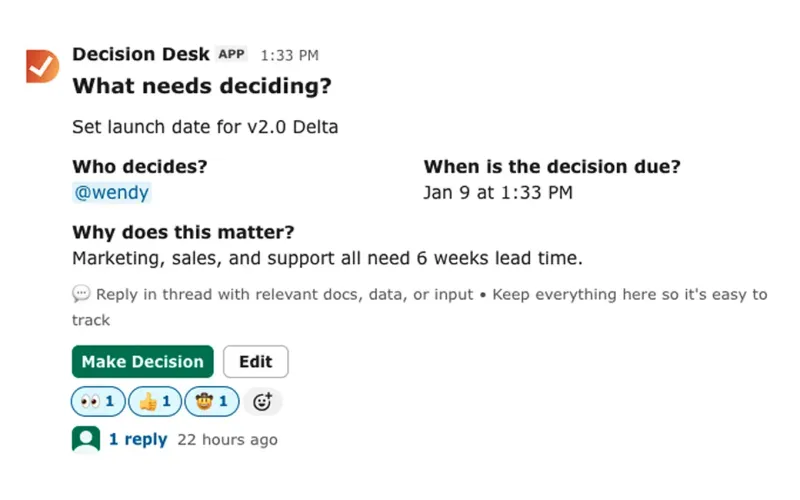
We embed decision ownership in our system by requiring a “Decision-Owner” field when logging a decision. That field triggers reminders and links to execution tasks. We’ve lived the pain of no owner; we built Decision Desk to stop that from happening.

Clarify decision criteria and timeline
You’d think everyone knows what “we need to decide X” means—but in practice they don’t. Clarity on what and by when matters.
Why It Matters
Teams argue about “when” unless a deadline is set.
Lack of criteria means decisions get revisited endlessly.
Without timeline, discussions stretch into months and the bottleneck grows.
How to Apply It
Ask at the start: “What are we deciding?” and “By when?”
Define criteria for the decision: cost, effort, impact, dependencies.
Assign a timeline: decision date, implementation start date.
Communicate these in Slack or a shared doc.
Pro tip: Pin the decision criteria message in the Slack thread so new joiners see the context.
Example
In a volunteer nonprofit, the team debated event dates casually. No one set criteria. Ultimately the date slipped three times. When we later said: “We decide by next Monday; budget under €2k; venue must host 150 people,” the date stuck.
In Decision Desk
Our system prompts users to record decision criteria (option list, weights) and timeline fields before marking a decision as “Ready.” This prevents vague discussions from being mis-treated as decisions.

Escalate when threads stall
Slack threads can die quietly. Silence is not agreement. If nothing happens, you have a bottleneck.
Why It Matters
Silence often masquerades as consensus—but it isn’t.
Waiting for “someone else” to act kills momentum.
A stalled decision blocks downstream work, eroding trust.
How to Apply It
Monitor decision threads: if no owner posts an update by mid-timeline, trigger escalation.
Escalation might mean: tagging a leader, scheduling a short call, or moving decision into a more structured channel.
Set a default fallback: “If not decided by date X, escalate to person Y.”
Track results of escalated decisions to avoid blame.
Pro tip: Use Slack reminders ("/remind") or a bot to nudge stalled threads automatically.
Example
At one company we worked with, a Slack thread on vendor choice had 40 messages and then died. A week later, marketing asked “What happened?” We escalated it to the director; she made the call within 24h. The team breathed again and were able to keep working.
In Decision Desk
We’ve built logic so when a decision is one day from its deadline and still open, the system sends an auto-reminder to owner + maybe manager. It tracks escalations so leaders see persistent bottlenecks.

Capture decisions and assign next steps
A discussion ends; someone says “Let’s go with option B”; then nothing is recorded. The decision vanishes.
Why It Matters
Without capturing the decision, future team members ask “what did we decide?”
Next steps without clarity mean tasks don’t start or get mis-assigned.
Capturing creates memory, so you avoid “reinventing” decisions.
How to Apply It
When a decision is made, post a summary: decision, rationale, owner, timeline, next steps.
Tag specific people for each next step and assign due dates.
Specify how you’ll measure success or when you’ll review.
Move the summary into a shared location (doc, wiki, or Slack pinned message).
Pro tip: Use a Slack thread with a consistent “decision done” tag (e.g., “✅Decision made”) so it’s searchable later.
Example
In a product launch team we made a decision on messaging. We posted: “✅ Decision: We will position X for audience Y because of Z. Owner: Sam. Launch: 15 Nov. Success metric: +15% engagement by end Q4.” That one post aligned marketing, engineering, design.
In Decision Desk
Our platform logs decisions and auto-creates next-step tasks. The decision summary lives alongside project plans and remains searchable months later. The memory of the decision becomes an asset, not a guess.

Review & embed decision history
Even when decisions happen, teams rarely reflect. The decision bottleneck resurfaces as repeat debates or rework.
Why It Matters
Reviewing decisions builds trust and learning culture.
Without embedding history, every new contributor asks “why did we do that?”
Decisions unreviewed become stale or mis-aligned with strategy.
How to Apply It
Schedule regular “decision-review” sessions (monthly or quarterly) where key recent decisions are revisited.
In each review ask: did we execute? Did the result match expectation? Should we adjust?
Archive decision summaries in a searchable repository (wiki, tool).
Use learnings to refine decision-making criteria and timelines.
Pro tip: At each onboarding include a short walkthrough of key past decisions, so new team members understand the logic behind “why we do things this way.”
Example
At one client we worked with, we created a quarterly “decision audit” meeting. We found 30% of decisions had no follow-ups. We focused on this and improved it the next quarter.
The culture shifted: teams made decisions faster and implemented them more reliably. They trusted that the process was relevant and would be used, so worth doing.

Implementing in Slack
Manual method first. If you’re working purely inside Slack (no external tool yet), here’s how to apply these principles:
Create a dedicated Slack channel (e.g., #decisions) or thread tag (e.g., #decision).
At start of thread, state: “Decision owner: @Name, Deadline: DATE, Criteria: …”
Use “/remind” to set reminders for deadlines and escalations.
Pin the summary message once the decision is made.
Use Slack’s search: filter channel #decisions and tag “✅Decision”.
At review time, export the summaries or copy into a wiki.
How Decision Desk automates it
At Decision Desk we integrate with Slack so when a decision thread is tagged, it captures the owner, criteria, date and next steps in our system. Teams work where they already are (Slack) and avoid a separate tool-workflow. Decisions become visible, tracked, and acted on — not stuck in chat.
Closing reflection
When teams use Slack to talk, they often think they’re moving. But talk isn’t action. Decisions stall. Momentum shrinks. We built Decision Desk because we lived this. By applying the five principles—ownership, clarity, escalation, capture, review—you shift from discussion to execution. Your Slack becomes a place not only for the conversation, but for the conclusion, the commitment and the follow-through. You build a habit of “decide and do”.
If you’re ready to make this easy inside Slack, Decision Desk helps you start where you already work. “Momentum is made, not assumed.”
Frequently asked questions
What is a “Slack decision bottleneck”?
It’s when team decisions start in Slack but no clear ownership, timeline or follow-through is set, so progress stalls and the decision drifts.
How do I assign decision ownership in Slack?
At the start of the thread state: “Owner: @Name” and make sure that person confirms their authority and deadline for the decision.
Why should we define decision criteria and timeline?
Because without clear criteria you get endless debate; without a timeline the decision floats. Both lead to delays and confusion.
When should a Slack thread be escalated?
If the decision owner hasn’t posted an update by the agreed date, or if the thread has no clear next steps, then escalate to a higher-level person or move to a faster format.
How do we capture and store decisions made in Slack?
Post a summary message with decision, rationale, owner, timeline, next steps; pin it; optionally copy into a shared repository or wiki for future reference.
Why conduct decision-reviews and embed history?
Because reviewing what got done vs-what was expected builds trust, avoids repeat discussions, and makes decision-making part of the team’s rhythm and culture.
Progress moves at the speed of decisions.