Last updated: November 1, 2025
Slack doesn’t cause chaos — it amplifies it. With small shifts in how your team communicates, tracks, and follows up, Slack can transform from a chat stream into your clearest decision system.
Table of Contents


Last updated: November 1, 2025
Slack doesn’t cause chaos — it amplifies it. With small shifts in how your team communicates, tracks, and follows up, Slack can transform from a chat stream into your clearest decision system.
Table of Contents
We’ve all seen it: the Slack thread that starts with energy and ends with silence. Ten replies, no decision, no owner, no closure.
It’s not that Slack fails us — it reflects us. The same habits that slow decisions in meetings show up in chat: vague ownership, unclear outcomes, and missing context.
After years of helping teams document and accelerate decisions, one pattern always shows up: how you use Slack is how you decide. The faster your clarity loops, the faster your progress.
This guide isn’t about more apps or stricter rules. It’s about five habits that make Slack the decision space it was meant to be — where ideas move, ownership is visible, and action follows naturally.
By the end, you’ll have a set of routines any team can use to turn talk into traction.

Make channels work like projects
A busy workspace isn’t a productive one. Channels often become cluttered catch-alls instead of focused hubs.
Why It Matters
Scattered context means scattered ownership.
Decisions dissolve when every topic competes for attention.
Threads lose weight when they’re buried in #general.
How to Apply It
Create channels for distinct decisions or projects — e.g., #d-pricing-review.
Use pinned posts for summaries or current status.
Archive channels when a project or decision cycle is closed.
Keep naming consistent (#dec-ops, #dec-product-roadmap).
💡 Pro tip: Prefix decision channels with “dec-” or “d-” — easy to search, easy to follow.
Example
At one client, every cross-functional discussion happened in #strategy. People lost threads daily.
Once they split into #dec-pricing and #dec-hiring, Slack stopped being a chat log and became a living record of what was decided and why.
In DecisionDesk
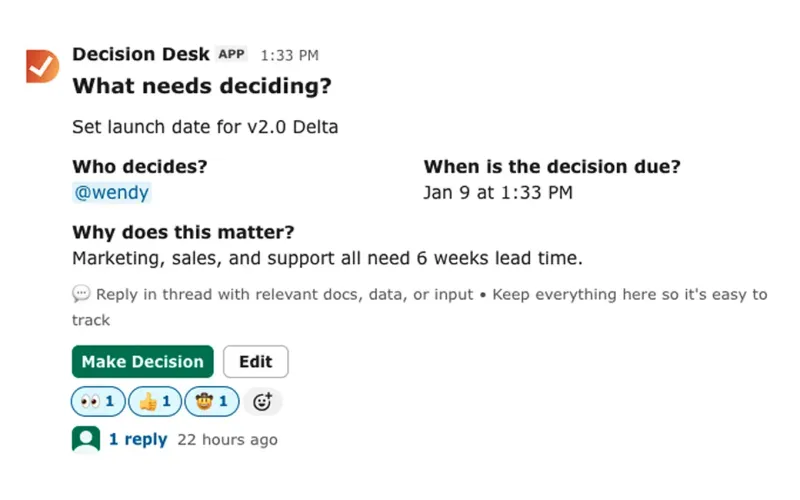
DecisionDesk builds on this structure — capturing outcomes directly from Slack and organizing them into clear, searchable decisions. When channels mirror decision categories, you create a feedback loop between Slack and visibility.

Assign one clear decision owner
A thread without an owner is a conversation. A thread with one is momentum.
Why It Matters
Ownership accelerates action.
Everyone knows who closes the loop.
Accountability stops being emotional — it’s structural.
How to Apply It
Tag the decision owner in the thread (@owner or “Assigning to @name”).
React with ✅ once ownership is confirmed.
Add the owner to the pinned summary message.
Keep a shared “decision owners” list in Slack or DecisionDesk.
💡 Pro tip: Add “DO:” before the owner’s name when summarizing (“DO: Alex”) so you can search later.
Example
When a product call needed a decision on a new onboarding flow, nobody owned it. Three weeks later, it resurfaced with confusion.
Now, the same team has a norm: the initiator always tags a Decision Owner before a thread hits 10 messages.
In DecisionDesk
Every logged decision requires one owner. If none is assigned, DecisionDesk flags it automatically — a small constraint that prevents big confusion.

Summarize calls, don’t bury them
Threads die because no one summarizes. You think you’ll remember — you won’t.
Why It Matters
Summaries reduce cognitive load.
They save people who weren’t in the conversation.
They create an anchor for follow-up.
How to Apply It
End every major discussion with a one-line summary: “Decision: Move forward with option B.”
Pin that message.
If it’s an open question, mark it “Pending decision.”
Add the date and next step.
💡 Pro tip: Use Slack’s emoji shorthand — 🧠 for discussions, ✅ for final calls.
Example
A marketing team used to hold hour-long Slack brainstorms and lose everything. Then they started posting “TL;DR” summaries. The next day, everyone knew exactly what changed.

Keep decision context visible
Context makes decisions credible. Without it, Slack becomes a rumor mill.
Why It Matters
When context disappears, people question the outcome.
Decisions look arbitrary without reasoning.
Visibility builds trust across functions.
How to Apply It
Pin the message that explains why the decision was made.
Use threads to store supporting docs or links.
Encourage reactions instead of re-litigating decisions.
💡 Pro tip: Add a “Context” section in pinned messages — even one line helps (“We chose X because it scales faster”).
Example
At one SaaS company, a VP changed a pricing tier. No one knew why. By keeping context pinned, future team members understood reasoning instantly.
In DecisionDesk
Each decision includes a context field — visible, linkable, and exportable. That transparency prevents inherited decision debt.

Follow up where the work happens
A decision only matters if it survives follow-up. Slack should close the loop, not just start it.
Why It Matters
Follow-through defines culture.
Reminders keep decisions alive.
Feedback loops drive better next calls.
How to Apply It
Use Slack reminders (/remind) tied to each decision thread.
Follow up in the same thread — not a new channel.
Acknowledge when work is done (reaction ✅).
Archive threads when complete.
💡 Pro tip: Use a recurring reminder to revisit decisions quarterly — to see what’s working.
Example
An operations team had recurring chaos after launches. Once they tied /remind to key decisions, their review process stabilized. Slack became their pulse-check system.
In DecisionDesk
Slack reminders can trigger decision reviews directly inside DecisionDesk. The system automates follow-ups, so decisions don’t disappear into chat history.

Implementing in Slack
Slack is already your team’s daily workspace — you don’t need new tools, just new habits.
Create dedicated channels for key decisions.
Pin context and outcomes.
Tag clear owners.
Use reminders and reactions as your feedback system.
💡 Pro tip: Add a “Decisions” section in your channel topic — every new member will see your standards instantly.
When you’re ready to go further, DecisionDesk builds on these patterns — capturing every Slack decision automatically, making them visible and trackable across your organization.
Closing reflection
Slack doesn’t need to be cleaner. It needs to be clearer.
When ownership, context, and follow-up are visible, conversations stop looping — they start landing. Decisions only die in the dark. Keep them visible.
Progress moves at the speed of decisions.