Decision Desk app coming soon. Thanks for being early.
Installation & Setup
Connect Decision Desk to Slack and configure your workspace settings.
Help Center > Installation & Setup
How to install Decision Desk
Three steps. One minute. Ready to track decisions.

Click "Add to Slack"
Visit decisiondesk.io and click the "Add to Slack" button. You'll be redirected to Slack's authorization page.
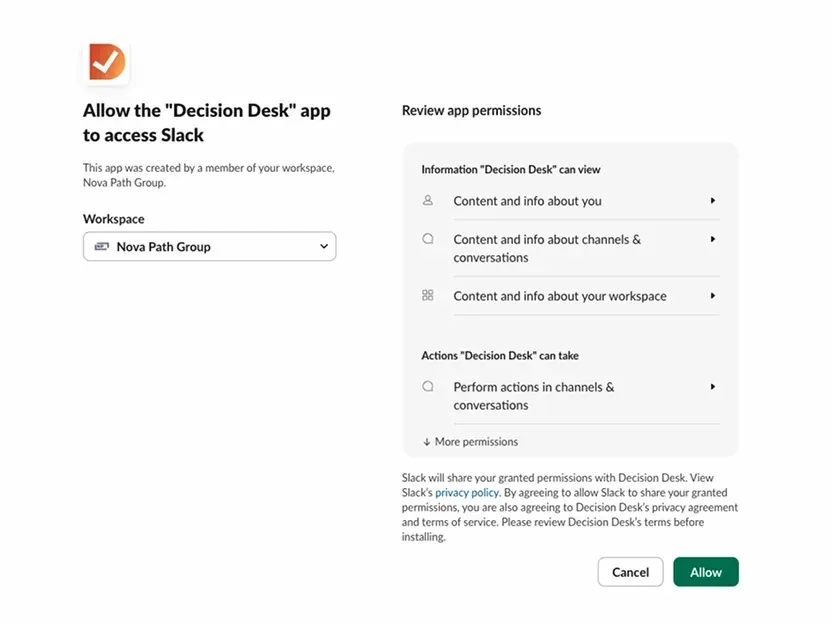
Authorize permissions
Review the permissions and click Allow. Decision Desk needs access to post messages and read commands in channels you invite it to.
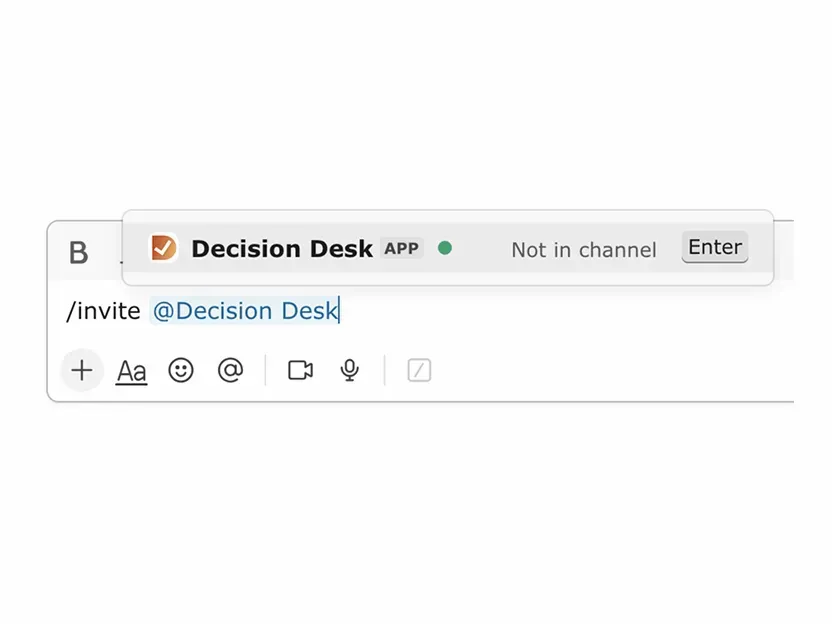
Invite to a channel
/invite @decisiondesk in any channel where you want to track decisions. Repeat for additional channels.
Tips
Start with one channel — Test in a team channel before rolling out company-wide
Admins only — You need Slack admin permissions to install apps
Private channels work too — Just invite Decision Desk the same way
Help Center > Installation & Setup
What's Next?
Getting Started:
Onboarding - Get Decision Desk running in your Slack workspace in under 2 minutes.
Create First Decision - Log your first decision using the /decision command.
Slack Commands - All the slash commands you can use in DecisionDesk.
Getting Started FAQ's - Quick answers to common setup questions.
Need help? Email support@decisiondesk.io — we respond within 24 hours.
We use cookies to improve user experience. Choose what cookie categories you allow us to use. You can read more about our Cookie Policy by clicking on Cookie Policy below.
These cookies enable strictly necessary cookies for security, language support and verification of identity. These cookies can’t be disabled.
These cookies collect data to remember choices users make to improve and give a better user experience. Disabling can cause some parts of the site to not work properly.
These cookies help us to understand how visitors interact with our website, help us measure and analyze traffic to improve our service.
These cookies help us to better deliver marketing content and customized ads.